You can't hear yourself sing.
Bone conduction and the feel of producing a note distort your voice before it ever reaches your ears. Tunagram takes a song you already have, lifts its vocal line out, and draws it as a melody you sing against — every note judged as you pass it, and an honest score at the end. All of it on your own Mac or iPad.
Private beta · Free · Apple silicon Mac or iPad
Singing is the one instrument you can't stand back from.
A violinist hears the string. A pianist hears the hammer. A singer hears a signal that has travelled through their own skull before it reached their ear — mixed with the muscular sensation of producing the note, which the brain readily mistakes for evidence about the sound itself. Effort feels like accuracy. It usually isn't.
That's why a second pair of ears has always been part of learning to sing, and why an hour with a good teacher is worth more than a week of solitary repetition. But most practice happens alone, between lessons, in the gap where nobody is listening — and it is exactly there that a phrase learned slightly flat, or a leap that lands under the note every single time, gets rehearsed into permanence.
Tunagram doesn't replace the teacher, and it never invents a judgement: everything on its screen derives from a measured comparison between your voice and the song's own melody. What it does is narrow: it makes the measurable part of your singing visible while you practise — every note judged, in the moment, against the line you're actually learning — so the practice you do alone reinforces what you meant rather than what you happened to produce.
The song's melody, and your voice against it.
Everything below comes from one comparison — the notes you sang versus the notes the song's own singer sang — made on your own device, in real time, as you go.
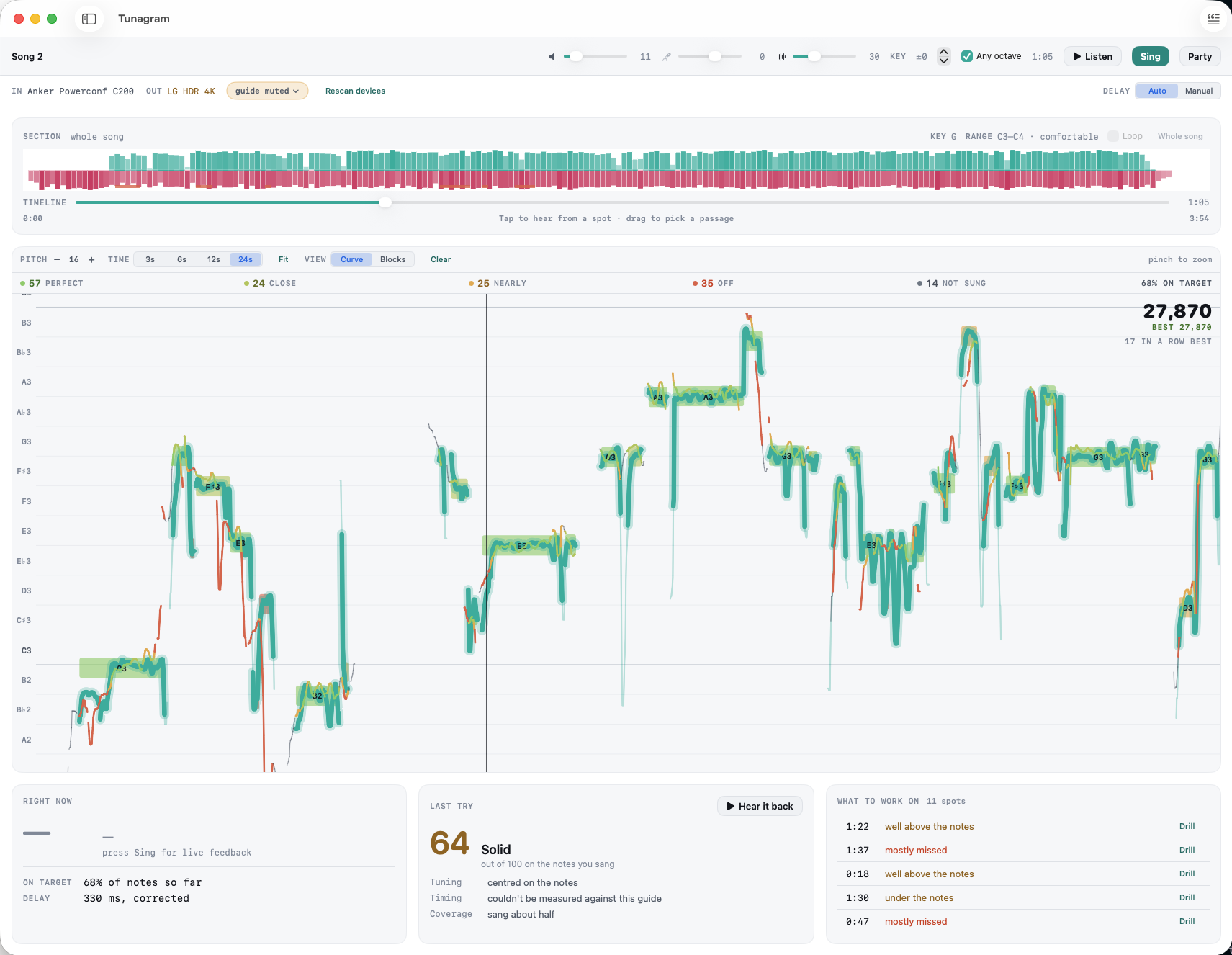
Drawn as it's actually sung
Import a recording and Tunagram separates the voice out and traces its melody as a contour — scoops, glides and all. Real melodies don't move in flat steps, and Tunagram doesn't draw them as if they should.
Every note judged, in place
As the playhead clears each note it's judged against the melody — PERFECT within 20 cents, CLOSE within 40, NEARLY within 75, OFF beyond that — and the note keeps its verdict's colour, so the roll you just sang doubles as the score sheet.
A number you can trust
The 0–100 comes from note verdicts, not frame-counting — the slides between notes are never held against you. And octaves fold: take a line written for someone else's voice into your own octave and it still counts.
Drill it, don't just run it
Drag out a section and work only that passage. Transpose the key — the audio you hear, the targets you see and the judging all move together, so what's scored is what's on screen. Listen with the mic closed; sing when you're ready. Every try is kept on your device to compare.
Import, listen, sing.
Import a song you already have
Any recording. Tunagram separates the vocal from the backing on your own device and traces the melody out of it — nothing is uploaded anywhere, and no songs ship with the app. Your repertoire is the exercise library.
Listen first, with the mic closed
Play the song and hear its isolated vocal line over the backing while the melody scrolls past as a contour. Tap anywhere to jump. Listening never opens the microphone — your Mac or iPad only asks for mic access the first time you sing.
Sing, and see every note judged
Start a take and the microphone opens. Notes are judged as the playhead clears them and keep their verdict's colour; at the end you get a score out of 100, a plain-language note on what to work on, and the take is saved on your device so the next try has something to beat.
Before you ask for the beta.
Does my audio go anywhere?
No. Separation, pitch tracking and judging all happen on your own device, and the app contains no networking code at all — no account, no analytics, no update pings. Practice takes are saved locally, including a recording of your voice, so you can review and compare them; they stay on the device and never leave it. One honest footnote while we're in beta: TestFlight is Apple's, and it tells us install dates, session counts and crash reports. That's Apple measuring the beta, not the app measuring you — it never includes audio, songs or scores. The privacy policy has the specifics.
What songs does it come with?
None, on purpose. You import recordings you already have — the pieces you're actually learning — and Tunagram builds the practice material out of them on-device. Your repertoire is the exercise library.
Should I sing with speakers or headphones?
Speakers are the designed default. Tunagram automatically mutes the guide vocal while you're being scored — an in-tune guide reaching the microphone would be scored as you singing every note perfectly — and the backing over speakers is fine, because the app measures your audio route's delay and corrects the take for it. If you'd rather have the guide vocal in your ears while you sing, wear one ear on, one ear off: with both ears covered you can't hear your own voice properly, and intonation drifts exactly where you're trying to improve it.
The song doesn't fit my voice — wrong key, wrong octave.
Two tools. Key transpose moves the audio you hear, the targets you see and the judging together, so you're never scored against something different from what's on screen. And octaves fold: taking a line into your own octave — up or down — still scores as correct, because that's what real singers do with real songs.
Is this a tuner, or a karaoke game?
Neither. A tuner has no idea what you meant to sing; a karaoke game invents generosity to keep the night going. Tunagram is a practice instrument: the targets come from the actual song, every verdict is a measured distance in cents, and nothing on screen — points included — exists without a judged note behind it.
Does it handle melodies that glide?
Yes — it was built around them. A lot of real singing moves within a syllable (ornaments, scoops, and entire languages whose words carry their own pitch contours), so Tunagram draws the melody as a contour rather than flat steps and judges notes with room for the movement that belongs inside them. The note names and grid do assume twelve-tone equal temperament at A = 440.
Can it replace a voice teacher?
No, and it isn't trying to. It measures your intonation against a song's melody. It has nothing to say about breath, resonance, diction, registration, health, or musicianship — all of which need ears and judgement. Think of it as an instrument that makes one part of the picture visible between lessons.
What do I need to run it?
Either an Apple silicon Mac running macOS 15 Sequoia or later, or an Apple silicon iPad running iPadOS 18 or later. Any microphone the device can see will do — the built-in one is fine for pitch tracking. There is no iPhone build: the screen is a scrolling piano roll with a transport under it, and it needs the room. The app runs entirely offline on both.
Is the iPad version the same app?
The same code, and the same measurements — separation, melody tracing, judging and scoring are one shared core, so a score means the same thing on either. What differs is the idiom: touch instead of a pointer, a settings sheet instead of a settings window, and filing songs through a menu rather than by dragging. Two things are genuinely missing on the iPad, and it's fairer to say so now than to let you find them: you can play a practice take back inside the app but you can't pull the recording off the device as a file, and you can't drag to reorder songs inside a folder.
Tunagram is in private beta.
A small group of singers is practising with it now while the rough edges get filed off. Both builds come through TestFlight, Apple's beta app — so you'll need an Apple ID and a couple of minutes to install it. Tell us what you'd be testing on and what you'd be practising.
Request an invite Never mind
No licence key, no Tunagram account, and nothing that phones home — the app contains no networking code at all. Getting it does need an Apple ID, because TestFlight is Apple's.